
 Back to Home
I Want to Scan the Documents Myself
Scanning is a labor intensive process. If you have seen the movie "Groundhog Day," starring Bill Murray, then you have an idea of how a day of scanning will go.
There are essentially two options to scanning: (1) Batch -- all of the documents are scanned together and files are separated by blank sheets, bar codes, or some other identifier that will identify the different files after scanning. (2) Scan files individually -- processing, indexing, and saving one file before going to the next file.
To scan files yourself you will need:
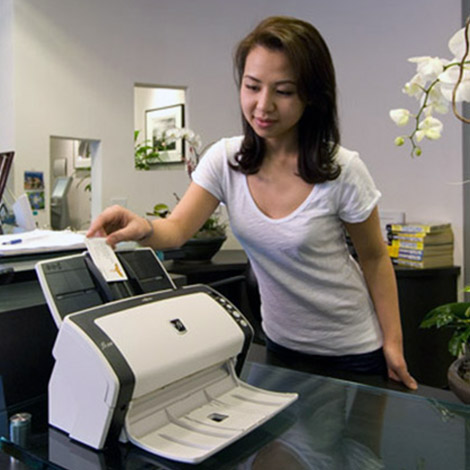
A Scanner, preferably one with an ADF (Auto Document Feeder)
Software (see below)
Staple puller and tape to prep the pages prior to scanning and, of course, a PC, and a CD/DVD burner, USB micro drive, or a hard drive.
There are many scanners available today. We recommend Fujitsu, and Kodak.
Look for scanners with a straight paper path versus a curved (half-circle) path. A straight paper path usually has fewer paper jams.
Also, consider the number of pages per day you will be scanning. Many of the scanners are rated with a "duty cycle", how many total pages per day they can handle on a consistent basis. Scanners are also rated by the number of pages per minute (PPM).
SOFTWARE: There are also many software options. You will need some type of scanning software and document management software. These can be combined into a single package or separate packages.
Again the choice comes down to what you will be doing and how much you will be doing.
Oftentimes scanning software will be bundled with the scanner. Document management software can range in price from hundreds to thousands of dollars. Again, the nature of the job will determine the type of software you will need.
For ARCHIVAL document management we recommend Adobe Acrobat.
For ACTIVE document management we recommend
CompuThink or
FileNexus from Loris Tech.
Databases are also useful in managing document retrieval. For
a custom data base solution contact
GPC Data or try
FileMaker Pro.
Need some help? Have some questions? Give us a call
or try Quick-Scan.
- 6 Tips to master Document Prep and Scanning (PDF)
- Calculate Return on Investment (ROI) (Excel XLS) (PDF)